1. The Helm install#
The operator installs the chart from the repository with PostgreSQL, an ingress and the backup
CronJob switched on. Below is
helm template with those values: the objects helm install would
create. It was not applied to a cluster.
# Not recorded against a cluster: this is what the chart renders for these values
$ helm template sanshain deploy/helm/sanshain --set secrets.databaseUrl=postgres://sanshain:secret@postgres.sanshain.svc:5432/sanshain --set secrets.initialAdminPassword=walkthrough-admin --set ingress.enabled=true --set 'ingress.hosts[0].host=sanshain.corp' --set 'ingress.hosts[0].paths[0].path=/' --set 'ingress.hosts[0].paths[0].pathType=Prefix' --set backup.enabled=true --set backup.engine=postgres
---
# Source: sanshain/templates/serviceaccount.yaml
apiVersion: v1
kind: ServiceAccount
metadata:
  name: sanshain
  labels:
    helm.sh/chart: sanshain-2.11.0
    app.kubernetes.io/name: sanshain
    app.kubernetes.io/instance: sanshain
    app.kubernetes.io/version: "2.11.0"
    app.kubernetes.io/managed-by: Helm
---
# Source: sanshain/templates/secret.yaml
apiVersion: v1
kind: Secret
metadata:
  name: sanshain-secrets
  labels:
    helm.sh/chart: sanshain-2.11.0
    app.kubernetes.io/name: sanshain
    app.kubernetes.io/instance: sanshain
    app.kubernetes.io/version: "2.11.0"
    app.kubernetes.io/managed-by: Helm
type: Opaque
data:
  DATABASE_URL: "cG9zdGdyZXM6Ly9zYW5zaGFpbjpzZWNyZXRAcG9zdGdyZXMuc2Fuc2hhaW4uc3ZjOjU0MzIvc2Fuc2hhaW4="
  INITIAL_ADMIN_PASSWORD: "d2Fsa3Rocm91Z2gtYWRtaW4="
---
# Source: sanshain/templates/configmap.yaml
apiVersion: v1
kind: ConfigMap
metadata:
  name: sanshain-config
  labels:
    helm.sh/chart: sanshain-2.11.0
    app.kubernetes.io/name: sanshain
    app.kubernetes.io/instance: sanshain
    app.kubernetes.io/version: "2.11.0"
    app.kubernetes.io/managed-by: Helm
data:
  BIND_ADDRESS: "0.0.0.0:3000"
  RUST_LOG: "info,sanshain_service=debug"
  MAX_POSTGRES_CONNECTIONS: "20"
  MAX_SQLITE_CONNECTIONS: "5"
  SQLITE_BUSY_TIMEOUT_MS: "5000"
  CLEANUP_INTERVAL_SECS: "3600"
  CSRF_MAX_AGE_HOURS: "24"
  LOG_BUFFER_SIZE: "100"
  SPEC_UPDATED_CHANNEL_SIZE: "100"
  CAPTURE_LOG_FILTER: "sanshain_service=debug,tower_http=debug"
  STATIC_DIR: "static"
  INITIAL_ADMIN_USERNAME: "root"
---
# Source: sanshain/templates/backup-pvc.yaml
apiVersion: v1
kind: PersistentVolumeClaim
metadata:
  name: sanshain-backup
  labels:
    helm.sh/chart: sanshain-2.11.0
    app.kubernetes.io/name: sanshain
    app.kubernetes.io/instance: sanshain
    app.kubernetes.io/version: "2.11.0"
    app.kubernetes.io/managed-by: Helm
spec:
  accessModes:
    - "ReadWriteOnce"
  resources:
    requests:
      storage: "5Gi"
---
# Source: sanshain/templates/pvc.yaml
apiVersion: v1
kind: PersistentVolumeClaim
metadata:
  name: sanshain-data
  labels:
    helm.sh/chart: sanshain-2.11.0
    app.kubernetes.io/name: sanshain
    app.kubernetes.io/instance: sanshain
    app.kubernetes.io/version: "2.11.0"
    app.kubernetes.io/managed-by: Helm
spec:
  accessModes:
    - "ReadWriteOnce"
  resources:
    requests:
      storage: "1Gi"
---
# Source: sanshain/templates/service.yaml
apiVersion: v1
kind: Service
metadata:
  name: sanshain
  labels:
    helm.sh/chart: sanshain-2.11.0
    app.kubernetes.io/name: sanshain
    app.kubernetes.io/instance: sanshain
    app.kubernetes.io/version: "2.11.0"
    app.kubernetes.io/managed-by: Helm
spec:
  type: ClusterIP
  ports:
    - port: 80
      targetPort: 3000
      protocol: TCP
      name: http
  selector:
    app.kubernetes.io/name: sanshain
    app.kubernetes.io/instance: sanshain
---
# Source: sanshain/templates/statefulset.yaml
apiVersion: apps/v1
kind: StatefulSet
metadata:
  name: sanshain
  labels:
    helm.sh/chart: sanshain-2.11.0
    app.kubernetes.io/name: sanshain
    app.kubernetes.io/instance: sanshain
    app.kubernetes.io/version: "2.11.0"
    app.kubernetes.io/managed-by: Helm
spec:
  replicas: 1
  serviceName: sanshain
  podManagementPolicy: OrderedReady
  selector:
    matchLabels:
      app.kubernetes.io/name: sanshain
      app.kubernetes.io/instance: sanshain
  template:
    metadata:
      labels:
        app.kubernetes.io/name: sanshain
        app.kubernetes.io/instance: sanshain
    spec:
      serviceAccountName: sanshain
      securityContext:
        fsGroup: 1000
      containers:
        - name: sanshain
          securityContext:
            runAsNonRoot: true
            runAsUser: 1000
          image: "ghcr.io/paxel/sanshain-service:v2.11.0"
          imagePullPolicy: IfNotPresent
          ports:
            - name: http
              containerPort: 3000
              protocol: TCP
          envFrom:
            - configMapRef:
                name: sanshain-config
            - secretRef:
                name: sanshain-secrets
          livenessProbe:
            httpGet:
              path: /health
              port: http
            initialDelaySeconds: 5
            periodSeconds: 10
          readinessProbe:
            httpGet:
              path: /health
              port: http
            initialDelaySeconds: 5
            periodSeconds: 10
          resources:
            limits:
              cpu: 500m
              memory: 512Mi
            requests:
              cpu: 100m
              memory: 128Mi
          volumeMounts:
            - name: data
              mountPath: /data
      volumes:
        - name: data
          persistentVolumeClaim:
            claimName: sanshain-data
---
# Source: sanshain/templates/backup-cronjob.yaml
apiVersion: batch/v1
kind: CronJob
metadata:
  name: sanshain-backup
  labels:
    helm.sh/chart: sanshain-2.11.0
    app.kubernetes.io/name: sanshain
    app.kubernetes.io/instance: sanshain
    app.kubernetes.io/version: "2.11.0"
    app.kubernetes.io/managed-by: Helm
spec:
  schedule: "0 2 * * *"
  concurrencyPolicy: Forbid
  successfulJobsHistoryLimit: 3
  failedJobsHistoryLimit: 3
  jobTemplate:
    spec:
      template:
        metadata:
          labels:
            app.kubernetes.io/name: sanshain
            app.kubernetes.io/instance: sanshain
            app.kubernetes.io/component: backup
        spec:
          restartPolicy: OnFailure
          securityContext:
            fsGroup: 1000
          containers:
            - name: backup
              securityContext:
                runAsNonRoot: true
                runAsUser: 1000
              env:
                - name: RETAIN
                  value: "7"
                - name: DATABASE_URL
                  valueFrom:
                    secretKeyRef:
                      name: sanshain-secrets
                      key: DATABASE_URL
              image: "postgres:17-alpine"
              command: ["/bin/sh", "-ec"]
              args:
                - |
                  rm -f /backup/*.part
                  out="/backup/sanshain-$(date -u +%Y%m%dT%H%M%SZ).dump"
                  pg_dump --format=custom --file="$out.part" "$DATABASE_URL"
                  mv "$out.part" "$out"
                  ls -1t /backup/*.dump | tail -n +$((RETAIN + 1)) | xargs -r rm -f
                  ls -l /backup
              volumeMounts:
                - name: backup
                  mountPath: /backup
          volumes:
            - name: backup
              persistentVolumeClaim:
                claimName: sanshain-backup
---
# Source: sanshain/templates/ingress.yaml
apiVersion: networking.k8s.io/v1
kind: Ingress
metadata:
  name: sanshain
  labels:
    helm.sh/chart: sanshain-2.11.0
    app.kubernetes.io/name: sanshain
    app.kubernetes.io/instance: sanshain
    app.kubernetes.io/version: "2.11.0"
    app.kubernetes.io/managed-by: Helm
spec:
  rules:
    - host: "sanshain.corp"
      http:
        paths:
          - path: /
            pathType: Prefix
            backend:
              service:
                name: sanshain
                port:
                  number: 80
What to notice
-
DATABASE_URLand the initial admin password live in the Secret, everything else in the ConfigMap. -
Two PersistentVolumeClaims:
sanshain-data(the chart's defaultpersistence, which an external PostgreSQL does not need:persistence.createPvc=falsedrops it) andsanshain-backupfor the CronJob. With thepostgres://URL the CronJob runspg_dump; with SQLite it would download the snapshot of step 8. - One StatefulSet with one replica: Sanshain runs as one instance, also on PostgreSQL. See Deployment: Scaling.
- Both probes, liveness and readiness, are
GET /health. -
secrets.initialAdminPasswordiswalkthrough-adminhere, the throwaway value the recording instance was started with, so step 2 logs in with it.
Go deeper
Deployment: the Helm chart · Deployment: SQLite or PostgreSQL · Backup: the Helm CronJob · Configuration: environment variables
2. The first login and the admin password#
On its first start the service creates the initial admin and prints the password to the log; here it is the throwaway value the Secret of step 1 carries, the one the recording instance was started with. The operator logs in, changes it, and finds that the session from before the change is gone.
The service log at first start
[INITIAL SETUP] Admin user created. Username: root, Password: walkthrough-admin
[INITIAL SETUP] Change this password immediately at https://sanshain.corp/admin.html
The second line names the admin page under PUBLIC_BASE_URL, which the recording
instance was started with (https://sanshain.corp, the ingress host of step 1);
without it, the bind address.
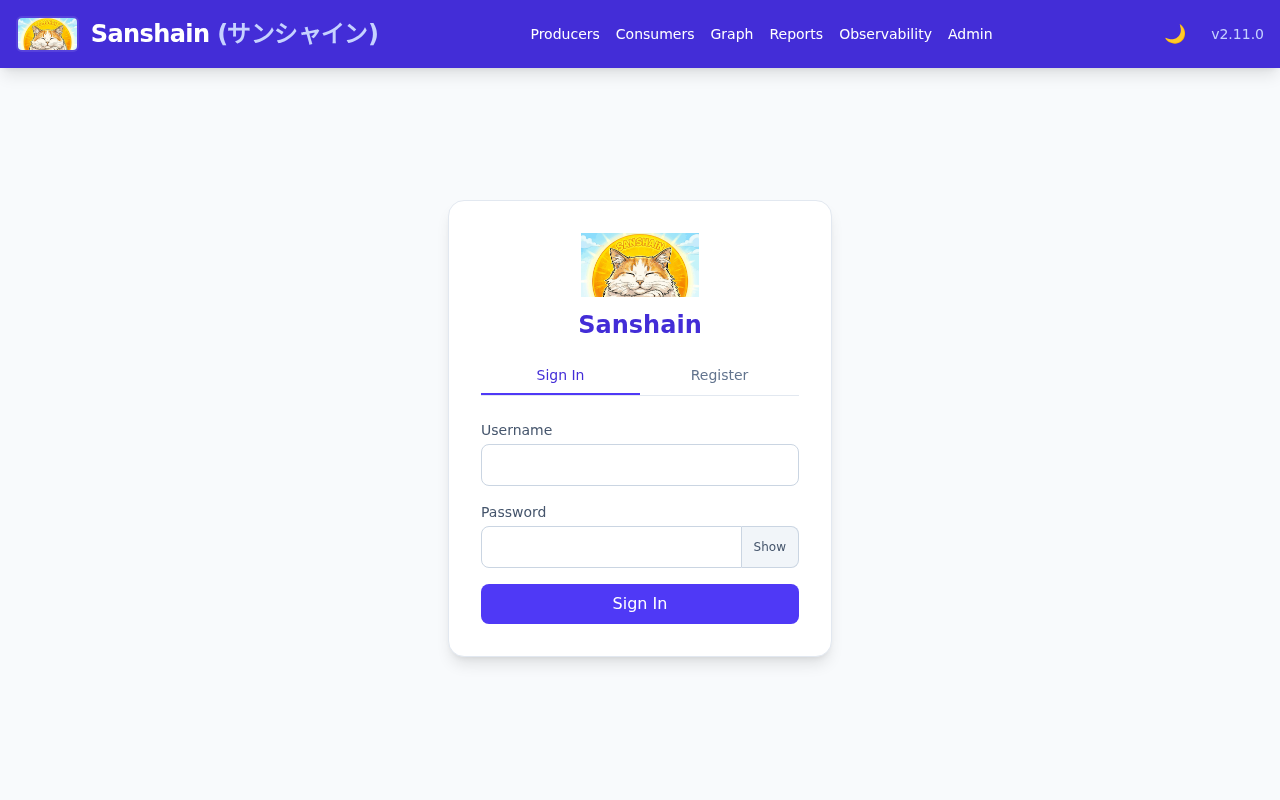
Login
POST /auth/login HTTP/1.1
Content-Type: application/json

{
  "username": "root",
  "password": "walkthrough-admin"
}

HTTP/1.1 200 OK
content-type: application/json
content-length: 76

{
  "token": "<session token>"
}
Change the password
POST /auth/change-password HTTP/1.1
Authorization: Bearer <session token>
Content-Type: application/json

{
  "old_password": "walkthrough-admin",
  "new_password": "walkthrough-admin-2026"
}

HTTP/1.1 200 OK
content-type: application/json
content-length: 76

{
  "token": "<session token>"
}
The old session afterwards
GET /auth/me HTTP/1.1
Authorization: Bearer <session token>

HTTP/1.1 401 Unauthorized
content-length: 0
What to notice
- The password change answers a fresh session token and ends every other session of the account: a script that administers logs in again.
-
rootis held by configuration (SANSHAIN_ROOT_USERS, or the initial admin's name); its authority cannot be revoked from inside the application.
Go deeper
Authentication: the initial admin and root · Getting started: first login · Using the API: sessions and API tokens
3. OpenID Connect, configured#
People sign in through the company's identity provider. OIDC is configured here through the
API (the admin page has an OIDC form as well): one PUT with the provider's values,
then a GET to see what is stored. No provider was reachable during the recording,
so this is the configuration only; the login itself is described in the chapter.
Configure
PUT /admin/auth-config HTTP/1.1
Authorization: Bearer <session token>
Content-Type: application/json

{
  "auth_mode": "oidc",
  "oidc_config": {
    "issuer_url": "https://login.acme.corp/realms/corp",
    "client_id": "sanshain",
    "client_secret": "oidc-client-secret-from-the-provider",
    "redirect_url": "https://sanshain.corp/auth/oidc/callback",
    "username_claim": "preferred_username",
    "groups_claim": "groups",
    "admin_group": "sanshain-admins"
  }
}

HTTP/1.1 200 OK
content-length: 0
The stored state
GET /admin/auth-config HTTP/1.1
Authorization: Bearer <session token>

HTTP/1.1 200 OK
content-type: application/json
content-length: 342

{
  "auth_mode": "oidc",
  "ldap_config": null,
  "oidc_config": {
    "admin_group": "sanshain-admins",
    "client_id": "sanshain",
    "client_secret": "****",
    "groups_claim": "groups",
    "issuer_url": "https://login.acme.corp/realms/corp",
    "redirect_url": "https://sanshain.corp/auth/oidc/callback",
    "scopes": [
      "openid",
      "email",
      "profile"
    ],
    "username_claim": "preferred_username"
  }
}
Back to local accounts, for the rest of this story
PUT /admin/auth-config HTTP/1.1
Authorization: Bearer <session token>
Content-Type: application/json

{
  "auth_mode": "local"
}

HTTP/1.1 200 OK
content-length: 0
In oidc mode nobody can register a local account, and step 4 registers one. The
mode goes back to local; the OIDC values stay stored for a later switch, the
sign-in form hides Sign in with SSO again, and the audit log of step 9 shows
both changes.
What to notice
-
The client secret is answered as
****; sending****back keeps the stored one, so a later edit cannot lose it. -
scopesgot its default;admin_groupgrants theadminrole to bearers of that claim value at login, and only grants. -
The redirect URL's origin is also the fallback for
PUBLIC_BASE_URL, the base of the webhook deep links in step 6.
Go deeper
Authentication: OpenID Connect · Authentication: modes · PUT /admin/auth-config
4. A user, a role, a maintainer scope, and the effect#
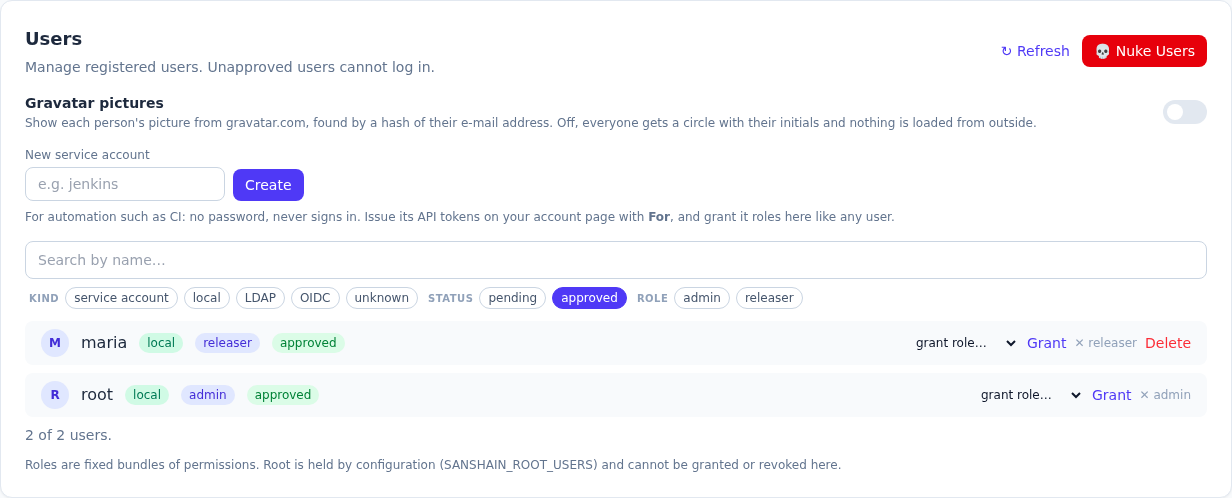
Registration starts closed, so the administrator opens it first. Maria registers herself,
which an administrator has to approve; the answer says so ("approved": false). She gets the
releaser role (she may publish GA and cut branches) and becomes a maintainer of
payments (she may delete its versions and manage its hooks). Then she logs in and
asks what she may do.
Open registration
POST /admin/settings/registration HTTP/1.1
Authorization: Bearer <session token>
Content-Type: application/json

{
  "enabled": true
}

HTTP/1.1 200 OK
content-length: 0
Registration
POST /auth/register HTTP/1.1
Content-Type: application/json

{
  "username": "maria",
  "password": "maria-walkthrough"
}

HTTP/1.1 201 Created
content-type: application/json
content-length: 18

{
  "approved": false
}
The user list, before approval
GET /admin/users HTTP/1.1
Authorization: Bearer <session token>

HTTP/1.1 200 OK
content-type: application/json
content-length: 280

[
  {
    "approved": false,
    "display_name": null,
    "gravatar_hash": null,
    "id": 2,
    "kind": "unknown",
    "roles": [],
    "service_account": false,
    "username": "maria"
  },
  {
    "approved": true,
    "display_name": null,
    "gravatar_hash": null,
    "id": 1,
    "kind": "local",
    "roles": [
      "admin"
    ],
    "service_account": false,
    "username": "root"
  }
]
Approve
POST /admin/users/2/approve HTTP/1.1
Authorization: Bearer <session token>

HTTP/1.1 200 OK
content-length: 0
Grant the role
POST /admin/users/2/roles HTTP/1.1
Authorization: Bearer <session token>
Content-Type: application/json

{
  "role": "releaser"
}

HTTP/1.1 201 Created
content-length: 0
Make her a maintainer of payments
POST /admin/producers/payments/maintainers HTTP/1.1
Authorization: Bearer <session token>
Content-Type: application/json

{
  "user_id": 2
}

HTTP/1.1 201 Created
content-length: 0
The effect: what maria's session may do
GET /auth/me HTTP/1.1
Authorization: Bearer <maria's session token>

HTTP/1.1 200 OK
content-type: application/json
content-length: 222

{
  "approved": true,
  "display_name": null,
  "display_name_editable": true,
  "gravatar_hash": null,
  "id": 2,
  "is_root": false,
  "maintains": [
    "payments"
  ],
  "permissions": [
    "release_ga"
  ],
  "roles": [
    "releaser"
  ],
  "sign_in": "local",
  "username": "maria"
}
What to notice
-
A role is a fixed bundle of permissions:
releaseris exactlyrelease_ga. Nothing else of the admin page opens for maria. -
maintains: ["payments"]is the scoped permission: the Producer's routes admit her, every other Producer's refuse her. -
Granting
adminorreleaserneeds an administrator;manage_rolesalone grants the other roles.
Go deeper
Roles and permissions: roles · Roles and permissions: maintainers · Getting started: letting users in · POST /admin/users/{id}/roles · POST /admin/producers/{name}/maintainers
5. The webhook allow-list#
A fresh install sends nothing: hooks may only point at hosts the administrator approved. The
operator allows Slack and, with the http:// prefix, a plain-HTTP receiver inside
the cluster. The recording's receiver was a small local server; the text shows it as
receiver.sanshain.svc, the screenshots show its real address,
http://127.0.0.1:18080.
POST /admin/settings/webhook-allowed-hosts HTTP/1.1
Authorization: Bearer <session token>
Content-Type: application/json

{
  "hosts": [
    "hooks.slack.com",
    "http://receiver.sanshain.svc"
  ]
}

HTTP/1.1 200 OK
content-type: application/json
content-length: 48

{
  "hosts": [
    "hooks.slack.com",
    "http://receiver.sanshain.svc"
  ]
}
What to notice
-
A pattern is a host name with
*and?; ports are not matched; the list comes back trimmed and lower-cased. - The list binds maintainers. A hook registered by an administrator is exempt from it, for good, and the listing marks it so.
- It is checked again at every delivery: removing a host stops deliveries to it.
Go deeper
Webhooks: the allow-list · POST /admin/settings/webhook-allowed-hosts
6. A hook, a test delivery, and the signature checked#
First the allow-list at work: maria, a maintainer of payments, tries to register
a hook for it at a host nobody allowed. Then root registers a global hook in Slack format at
the receiver; because root holds manage_settings the hook is marked
allow_list_exempt, whatever the list says. The operator sends a test event; the
worker delivers it within its interval; the receiver verifies the signature with the secret it
was given once.
A maintainer's hook at a host that is not allowed
POST /admin/producers/payments/webhooks HTTP/1.1
Authorization: Bearer <maria's session token>
Content-Type: application/json

{
  "url": "https://example.com/sanshain",
  "format": "json"
}

HTTP/1.1 403 Forbidden
content-type: application/json
content-length: 154

{
  "error": "the host 'example.com' is not in the webhook allow-list — ask an administrator to allow it, or use one of: hooks.slack.com, http://receiver.sanshain.svc"
}
Register, as root
POST /admin/webhooks HTTP/1.1
Authorization: Bearer <session token>
Content-Type: application/json

{
  "url": "http://receiver.sanshain.svc/sanshain",
  "format": "slack"
}

HTTP/1.1 201 Created
content-type: application/json
content-length: 344

{
  "webhook": {
    "id": 1,
    "scope": {
      "kind": "global"
    },
    "url": "http://receiver.sanshain.svc/sanshain",
    "format": "slack",
    "event_types": [],
    "producer_glob": null,
    "secret_hint": "5506bef1",
    "paused": false,
    "allow_list_exempt": true,
    "created_by": "root",
    "created_at": "2026-10-23T19:19:34Z"
  },
  "secret": "whsec_c7e296f64b64cc4f7f45b5b224cdd67804bdc0b4990d37718ff67dd9e7b7ed83"
}
Send a test event
POST /admin/webhooks/1/test HTTP/1.1
Authorization: Bearer <session token>

HTTP/1.1 202 Accepted
content-type: application/json
content-length: 51

{
  "event_id": "1e2af61a-0e68-41f9-a61d-47dfdbf4729b"
}
What the receiver got
POST /sanshain HTTP/1.1
Content-Type: application/json
Sanshain-Event: webhook.test
X-Sanshain-Delivery: 1
Sanshain-Signature: t=1792783174,v1=e896b36edf6d153e3038833337edbbb35e15201ff1a26b491c7d23a41474e4d0
User-Agent: Sanshain/2.11.0

{
  "text": "*webhook.test* — Test event from Sanshain for hook 1: This is a test event from Sanshain. If you can read this, the receiver, the signature secret and the allow-list are all in order. <https://sanshain.corp/admin.html|Open in Sanshain>"
}

HTTP/1.1 200 OK
The receiver's check
# The receiver's check, with the secret shown once at creation
$ python3 verify.py delivery.json whsec_…
signature header: t=1792783174,v1=e896b36edf6d153e3038833337edbbb35e15201ff1a26b491c7d23a41474e4d0
secret from the create answer: whsec_…
HMAC-SHA256 of '<t>.<raw body>': e896b36edf6d153e3038833337edbbb35e15201ff1a26b491c7d23a41474e4d0
valid: True
The delivery log
GET /admin/webhooks/1/deliveries?limit=5 HTTP/1.1
Authorization: Bearer <session token>

HTTP/1.1 200 OK
content-type: application/json
content-length: 351

[
  {
    "id": 1,
    "hook_id": 1,
    "event_id": "1e2af61a-0e68-41f9-a61d-47dfdbf4729b",
    "event_type": "webhook.test",
    "occurred_at": "2026-10-23T19:19:34Z",
    "status": "delivered",
    "attempts": 1,
    "next_attempt_at": "2026-10-23T19:28:54Z",
    "last_response_code": 200,
    "last_error": null,
    "delivered_at": "2026-10-23T19:19:34Z",
    "redelivered_at": null,
    "updated_at": "2026-10-23T19:19:34Z"
  }
]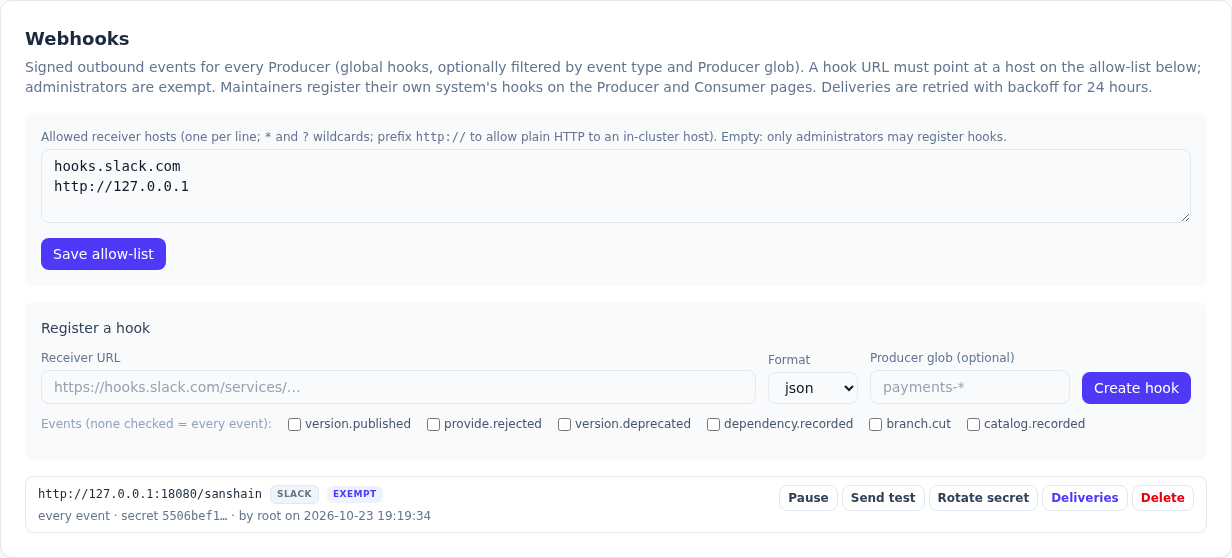
http://127.0.0.1:18080, named receiver.sanshain.svc in the text
above.
What to notice
-
The
403names the allowed hosts; a maintainer's hook atreceiver.sanshain.svcorhooks.slack.comwould have gone through. An administrator's hook is exempt, soexempton the badge means "registered by someone the list does not bind". -
The secret (
whsec_…) is in the registration answer and nowhere else afterwards; the listing showssecret_hint. -
Three headers accompany every delivery:
Sanshain-Event,X-Sanshain-DeliveryandSanshain-Signature,t=…,v1=HMAC-SHA256("t.body"). -
The Slack format is a ready-made message; the link in it uses
PUBLIC_BASE_URL. -
status: deliveredafter one attempt; a failed one would retry on the backoff schedule for 24 hours and can be redelivered by hand.
Go deeper
Webhooks: hooks in three scopes · Webhooks: verifying the signature · Webhooks: retries and redelivery · POST /admin/webhooks · POST /admin/webhooks/{id}/test · GET /admin/webhooks/{id}/deliveries
7. Retention, and a cleanup run#
Snapshots that nobody provides or requires any more should disappear. The operator sets the age and runs the cleanup once by hand to see what it does; from then on the scheduled pass does it.
Set the age
POST /admin/settings/snapshot-max-age HTTP/1.1
Authorization: Bearer <session token>
Content-Type: application/json

{
  "days": 30
}

HTTP/1.1 200 OK
content-length: 0
Run the cleanup now
POST /admin/cleanup/snapshots HTTP/1.1
Authorization: Bearer <session token>
Content-Type: application/json

{}

HTTP/1.1 200 OK
content-type: application/json
content-length: 13

{
  "deleted": 0
}
What to notice
-
deleted: 0: this instance is minutes old and every snapshot was promoted; the pass only removes snapshots unused for the configured days. - GA versions are never age-culled;
0days switches the cleanup off. - Both calls are audit entries (step 9).
Go deeper
Administration: retention and cleanup · Glossary: snapshot expiry · POST /admin/settings/snapshot-max-age · POST /admin/cleanup/snapshots
8. The snapshot the CronJob fetches, and the restore#
On SQLite the backup is one download, made by the engine (VACUUM INTO) so it is
consistent while the service runs. This is the call the Helm CronJob makes with a
full API token of an administrator. The restore below is the documented
procedure, written out for this snapshot; it was not performed on a cluster.
The download
GET /admin/backup/sqlite HTTP/1.1
Authorization: Bearer san_…

HTTP/1.1 200 OK
content-type: application/vnd.sqlite3
content-length: 405504
content-disposition: attachment; filename="sanshain-2.11.0-20261023T191936Z.db"

<405504 bytes of SQLite database, saved as sanshain-backup.db>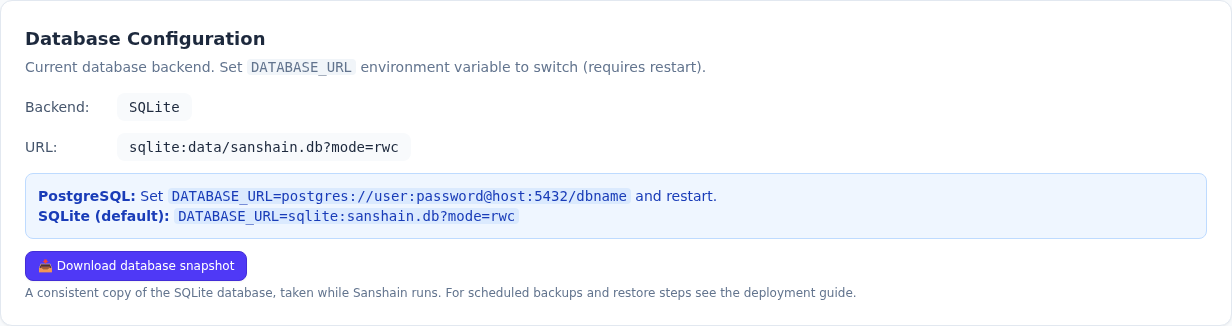
The restore, as documented
# Not recorded against a cluster: the restore procedure from Backup and restore,
# with the snapshot the CronJob fetched above (sanshain-2.11.0-20261023T191936Z.db).
$ kubectl scale statefulset sanshain --replicas=0
statefulset.apps/sanshain scaled
$ kubectl run restore --rm -it --image=busybox --overrides='{"spec":{"volumes":[{"name":"data","persistentVolumeClaim":{"claimName":"sanshain-data"}},{"name":"backup","persistentVolumeClaim":{"claimName":"sanshain-backup"}}],"containers":[{"name":"restore","image":"busybox","command":["sh"],"stdin":true,"tty":true,"volumeMounts":[{"name":"data","mountPath":"/data"},{"name":"backup","mountPath":"/backup"}]}]}}' -- sh
/ # cp /backup/sanshain-2.11.0-20261023T191936Z.db /data/sanshain.db
/ # rm -f /data/sanshain.db-wal /data/sanshain.db-shm
/ # exit
$ kubectl scale statefulset sanshain --replicas=1
statefulset.apps/sanshain scaled
$ kubectl logs statefulset/sanshain | grep -i migrations
INFO sanshain_service::infrastructure::sqlite_repository: Running SQLite migrations...
What to notice
- The file name carries the instance version and a UTC stamp; the migration runner brings an older snapshot's schema up on the next start, a newer one does not restore.
-
This is the only administrative route that takes an API token (the job's one credential); a
read_onlytoken is refused. -
On PostgreSQL the route answers
409and the chart renders apg_dumpCronJob instead.
Go deeper
Backup: SQLite · Backup: restore · Backup: PostgreSQL · GET /admin/backup/sqlite
9. The audit log after all of this#
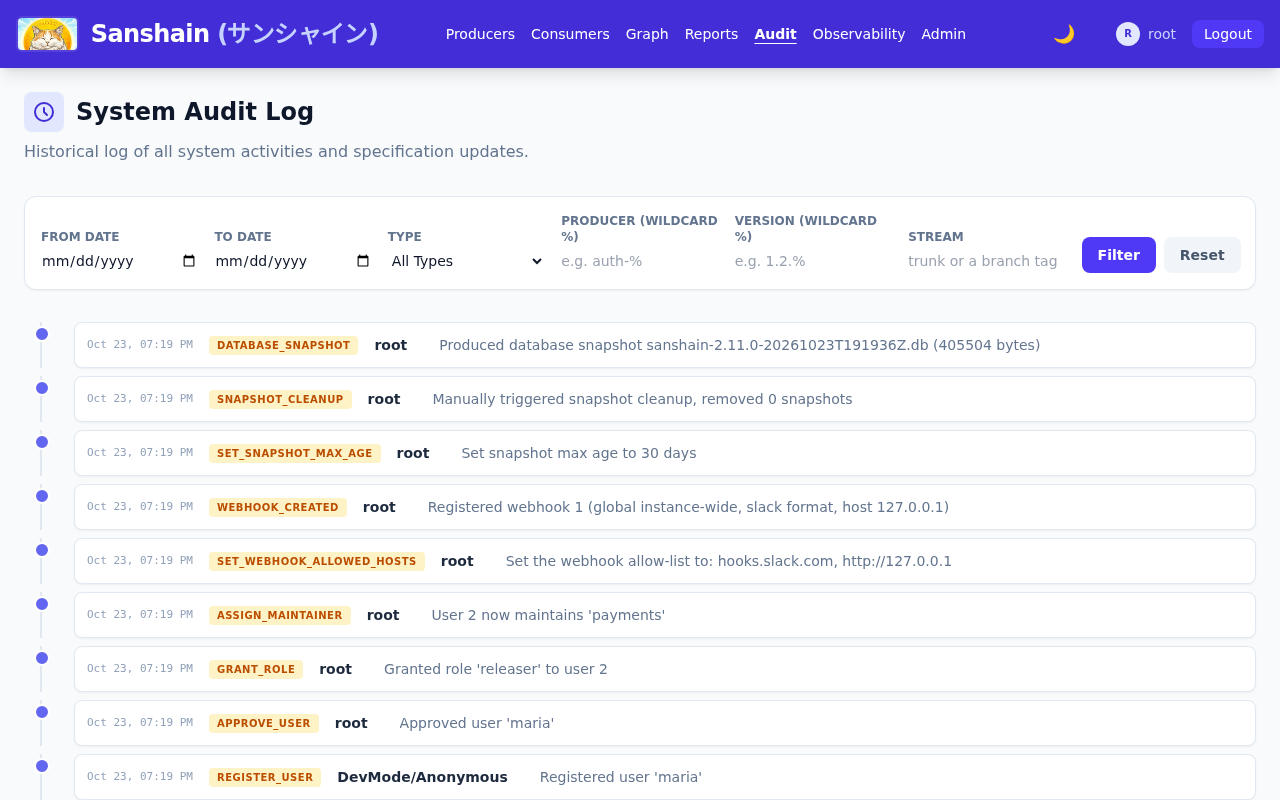
Everything the operator did landed in the audit log with the acting user. The observability panel's call lists the newest entries; the audit page shows the same with filters and diffs.
GET /admin/observability/audit-logs?limit=12 HTTP/1.1
Authorization: Bearer <session token>

HTTP/1.1 200 OK
content-type: application/json
content-length: 2913

[
  {
    "id": 28,
    "timestamp": "2026-10-23T19:19:36.126347416+00:00",
    "username": "root",
    "action": "DATABASE_SNAPSHOT",
    "details": "Produced database snapshot sanshain-2.11.0-20261023T191936Z.db (405504 bytes)",
    "service": null,
    "version": null,
    "action_type": "ADMIN",
    "diff": null,
    "stream": null
  },
  {
    "id": 27,
    "timestamp": "2026-10-23T19:19:36.074935831+00:00",
    "username": "root",
    "action": "SNAPSHOT_CLEANUP",
    "details": "Manually triggered snapshot cleanup, removed 0 snapshots",
    "service": null,
    "version": null,
    "action_type": "ADMIN",
    "diff": null,
    "stream": null
  },
  {
    "id": 26,
    "timestamp": "2026-10-23T19:19:35.994675958+00:00",
    "username": "root",
    "action": "SET_SNAPSHOT_MAX_AGE",
    "details": "Set snapshot max age to 30 days",
    "service": null,
    "version": null,
    "action_type": "ADMIN",
    "diff": null,
    "stream": null
  },
  {
    "id": 25,
    "timestamp": "2026-10-23T19:19:34.796491800+00:00",
    "username": "root",
    "action": "WEBHOOK_CREATED",
    "details": "Registered webhook 1 (global instance-wide, slack format, host receiver.sanshain.svc)",
    "service": null,
    "version": null,
    "action_type": "ADMIN",
    "diff": null,
    "stream": null
  },
  {
    "id": 24,
    "timestamp": "2026-10-23T19:19:34.719261005+00:00",
    "username": "root",
    "action": "SET_WEBHOOK_ALLOWED_HOSTS",
    "details": "Set the webhook allow-list to: hooks.slack.com, http://receiver.sanshain.svc",
    "service": null,
    "version": null,
    "action_type": "ADMIN",
    "diff": null,
    "stream": null
  },
  {
    "id": 23,
    "timestamp": "2026-10-23T19:19:34.604519092+00:00",
    "username": "root",
    "action": "ASSIGN_MAINTAINER",
    "details": "User 2 now maintains 'payments'",
    "service": null,
    "version": null,
    "action_type": "ADMIN",
    "diff": null,
    "stream": null
  },
  {
    "id": 22,
    "timestamp": "2026-10-23T19:19:34.566372611+00:00",
    "username": "root",
    "action": "GRANT_ROLE",
    "details": "Granted role 'releaser' to user 2",
    "service": null,
    "version": null,
    "action_type": "ADMIN",
    "diff": null,
    "stream": null
  },
  {
    "id": 21,
    "timestamp": "2026-10-23T19:19:34.522564727+00:00",
    "username": "root",
    "action": "APPROVE_USER",
    "details": "Approved user 'maria'",
    "service": null,
    "version": null,
    "action_type": "ADMIN",
    "diff": null,
    "stream": null
  },
  {
    "id": 20,
    "timestamp": "2026-10-23T19:19:34.437099708+00:00",
    "username": "DevMode/Anonymous",
    "action": "REGISTER_USER",
    "details": "Registered user 'maria'",
    "service": null,
    "version": null,
    "action_type": "ADMIN",
    "diff": null,
    "stream": null
  },
  {
    "id": 19,
    "timestamp": "2026-10-23T19:19:34.380718179+00:00",
    "username": "root",
    "action": "SET_REGISTRATION",
    "details": "Set registration to true",
    "service": null,
    "version": null,
    "action_type": "ADMIN",
    "diff": null,
    "stream": null
  },
  {
    "id": 18,
    "timestamp": "2026-10-23T19:19:34.331532195+00:00",
    "username": "root",
    "action": "UPDATE_SETTINGS",
    "details": "Updated auth mode to 'local' and LDAP configurations",
    "service": null,
    "version": null,
    "action_type": "ADMIN",
    "diff": null,
    "stream": null
  },
  {
    "id": 17,
    "timestamp": "2026-10-23T19:19:34.258883756+00:00",
    "username": "root",
    "action": "UPDATE_SETTINGS",
    "details": "Updated auth mode to 'oidc' and LDAP configurations",
    "service": null,
    "version": null,
    "action_type": "ADMIN",
    "diff": null,
    "stream": null
  }
]
What to notice
-
Administrative entries have
action_type: ADMINand adetailsline meant to be read as it is; spec updates carryservice,version,streamand a diff. -
A self-registration has no signed-in actor, so it is recorded under
DevMode/Anonymous; the approval names the administrator. -
Reading it needs
view_audit(admin and viewer roles);/admin/observability/audit-logs/exportgives the whole log.
Go deeper
Administration: the audit log · The web UI: the audit timeline · GET /admin/observability/audit-logs
10. The observability page and /metrics#
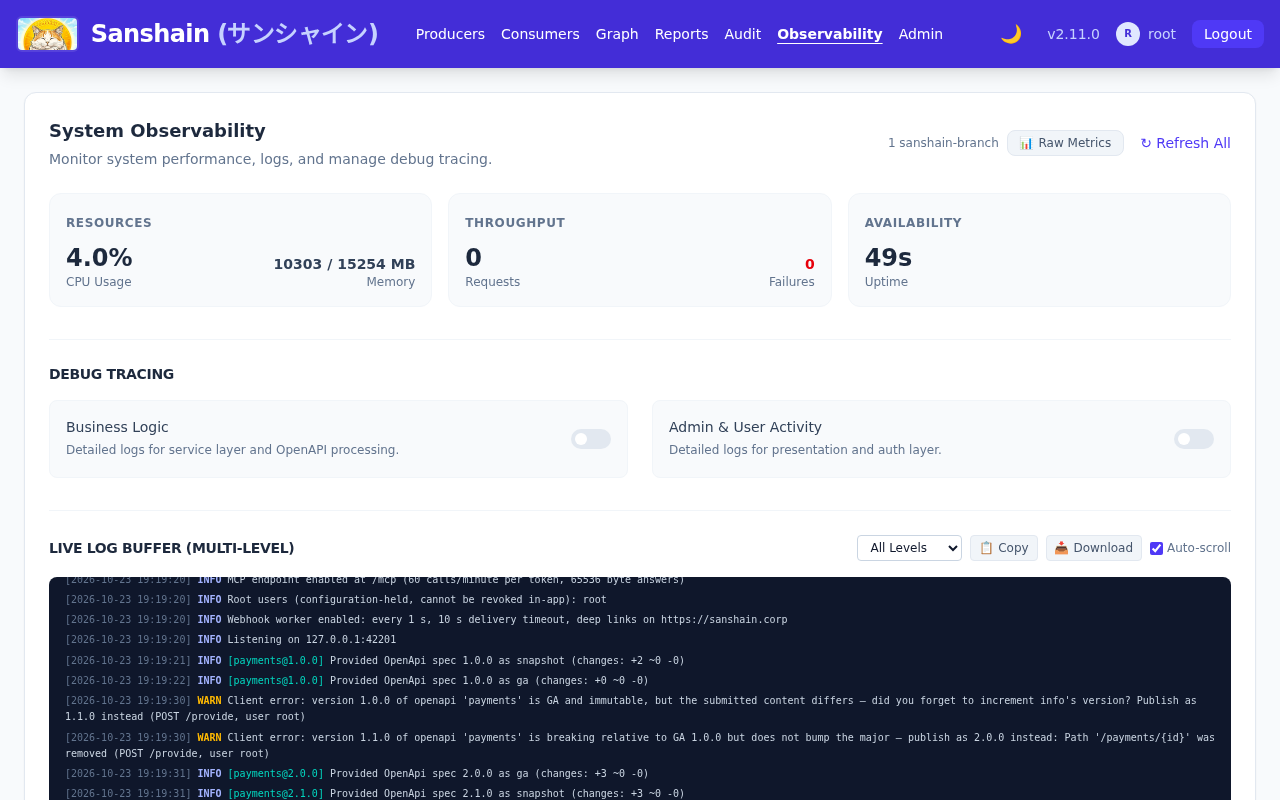
The observability page shows resources, throughput, the live log buffer and the debug
switches; Prometheus scrapes
/metrics. The excerpt below is every sanshain_* line after both
stories: two rejected provides, one catalog push, one branch, one delivery, one MCP call.
$ curl -s https://sanshain.corp/metrics | grep '^sanshain_'
sanshain_branches 1
sanshain_branch_updates_total{branch="release-2026.10"} 1
sanshain_catalog_pushes_total 1
sanshain_mcp_result_bytes_total{tool="describe_service"} 2098
sanshain_mcp_tool_calls_total{tool="describe_service",outcome="ok"} 1
sanshain_version_rejected_total{reason="breaking_without_major",producer="payments"} 1
sanshain_version_rejected_total{reason="immutable_ga",producer="payments"} 1
sanshain_webhook_deliveries_total{outcome="delivered"} 1
sanshain_webhook_outbox_pending 0
What to notice
-
sanshain_version_rejected_totalby reason and Producer is the first thing to alert on: a pipeline keeps failing somewhere. -
sanshain_webhook_outbox_pendingclimbing whilesanshain_webhook_deliveries_total{outcome="failed"}climbs means a receiver is down or left the allow-list. - The HTTP metrics of the Axum layer are there too; the chapter lists every family.
Go deeper
Observability: Prometheus metrics · Observability: the page · Observability: logs