Documentation for v2.7.0. Read the latest, v2.12.0.
Operator
Authentication
Humans sign in with a password, through the directory or through an OpenID Connect provider; builds and scripts always use an API token. This chapter is the human side: how a login is checked, where the accounts come from, and what keeps an operator from locking themselves out.
What changed in 2.6.0
-
A directory that accepts the connection and never answers fails within 10 s
(
LDAP_OPERATION_TIMEOUT_SECS) with a message naming the URL and the likely scheme and port mismatch, instead of hanging until the ingress answers502. -
The image trusts public certificate authorities, so
ldaps://against a publicly signed directory needs no certificate mount.
Authentication modes#
The mode is a setting (auth_mode), chosen in the
Authentication section of /admin.html or with
PUT /admin/auth-config (manage_auth_config). The first start sets
local.
| Mode | Admin page | Effect |
|---|---|---|
disabled |
OFF / Maintenance |
Every Producer and Consumer API call answers 503
Service is in Maintenance Mode / Disabled, and
POST /auth/login answers 403. Existing sessions keep working on
the admin routes, which is how you switch back.
|
dev |
Dev Mode |
Requests developer mode; effective only with the environment
gate. Password login works as in local.
|
local |
Local Users | Accounts in Sanshain's own database, Argon2 password hashes. |
ldap |
LDAP | The password is checked against the directory; local accounts and root still log in when the directory refuses or is down. |
oidc |
none; API only | Browser login through the provider's redirect flow. The password endpoint stays open for local accounts and root. |
PUT /admin/auth-config accepts off and maintenance as
spellings of disabled; any other mode answers 400
Invalid auth mode: …. ldap without an ldap_config in the
same request answers LDAP config required for ldap mode; oidc without an
oidc_config stored or supplied answers
OIDC config required for oidc mode. Every change is an
UPDATE_SETTINGS audit entry.
Administrative routes (/admin/*) take a session token from
POST /auth/login; an API token on them answers 401. The one exception is
the backup download, which admits a full API token. A session lasts 7 days.
Local accounts#
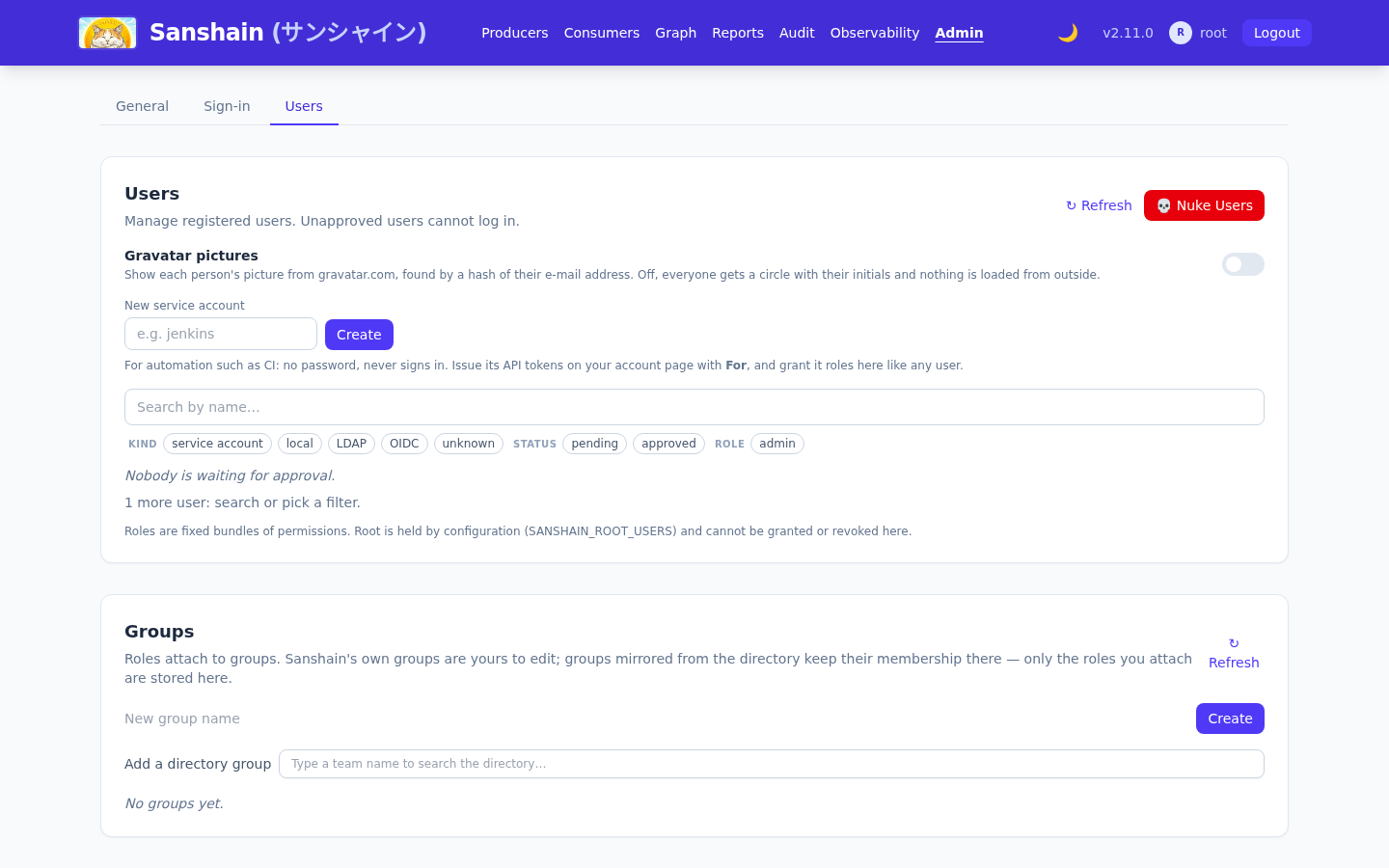
Anyone can register on the Register tab of the sign-in page or with
POST /auth/register ({"username","password"}); there is no switch that
closes registration. A new account is pending until an administrator approves it (approval): the Users section of the admin page, or
POST /admin/users/{id}/approve (manage_users). A pending user's login
answers 403; a wrong password 401, and so does an empty one, refused
before any check. The Auto Acknowledge New Users toggle
(auto_approve_users) approves new registrations at once; it is off by default and
meant for a lab, not for a company. In the Users list every account carries its
badges: one per role it holds directly (admin, viewer, …), and
approved or pending.
Registration refuses a name twice: 409 User already exists, and
409 This username is reserved for every name in SANSHAIN_ROOT_USERS
that has no account yet (startup creates a locked one, see
Root users). Deleting a user (DELETE /admin/users/{id}) revokes their sessions and API tokens. Users change their own password on
/account.html; there is no administrative password reset.
The initial admin and root#
On the first start, with no user in the database, Sanshain creates
INITIAL_ADMIN_USERNAME (root) with
INITIAL_ADMIN_PASSWORD or a random password, grants it the admin role
and prints both lines to stderr:
[INITIAL SETUP] Admin user created. Username: root, Password: <random>
[INITIAL SETUP] Change this password immediately at https://sanshain.corp/admin.html
The second line names the admin page under PUBLIC_BASE_URL; without it, under the
bind address (http://0.0.0.0:3000/admin.html by default). A set but empty
INITIAL_ADMIN_PASSWORD counts as unset, and an empty password is never accepted at
login.
That account is also root by the default of
SANSHAIN_ROOT_USERS: every permission, including ones no role grants, from
configuration rather than from the database. Name a second account there as the break-glass path;
the full rules are in Configuration.
LDAP and Active Directory#
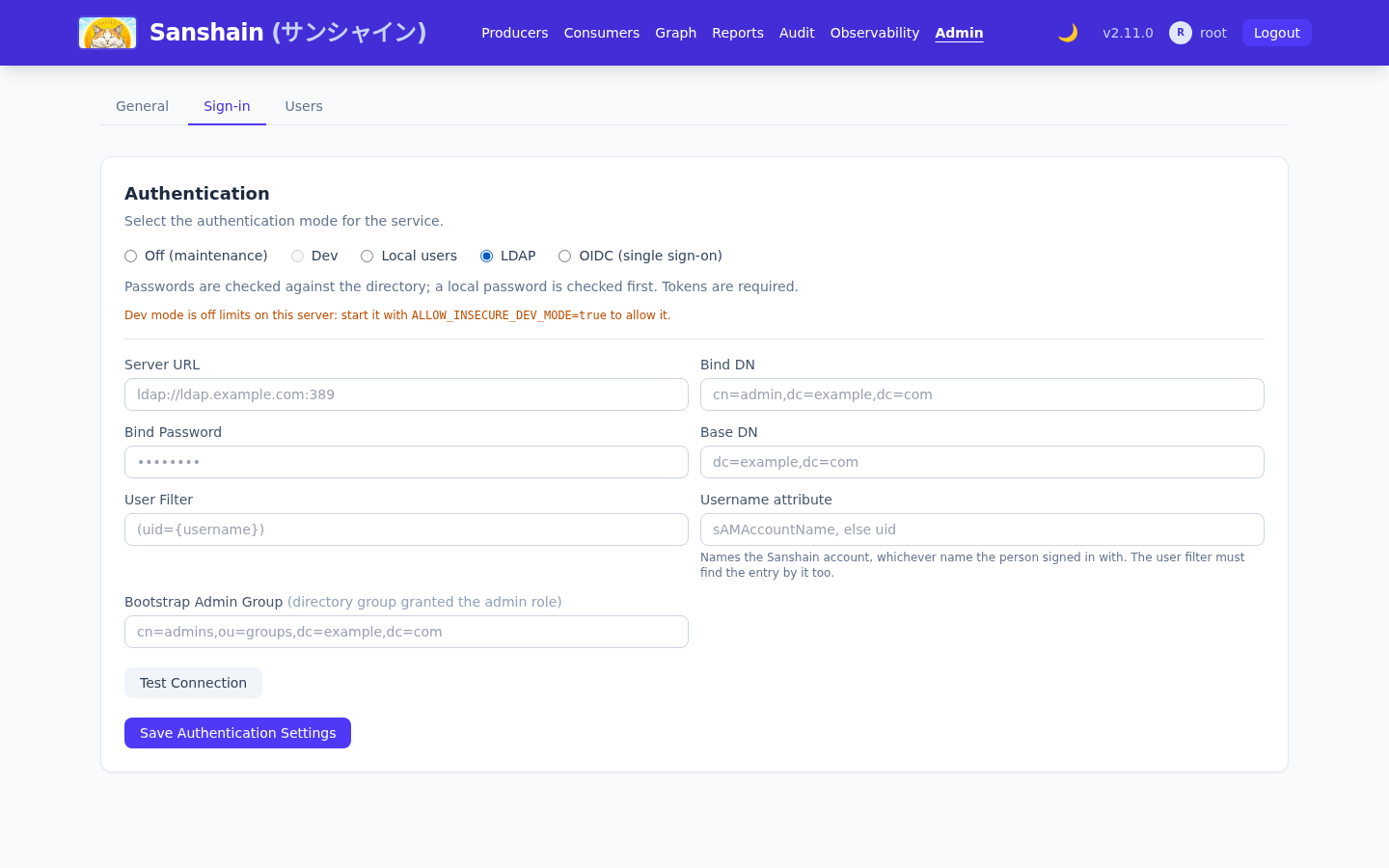
Select LDAP in the Authentication section and fill the form:
| Field | Meaning | Example |
|---|---|---|
Server URL (server_url) |
ldaps:// is TLS from the first byte; ldap:// is plain, or StartTLS
with use_tls. Without a port, 636 for ldaps:// and 389 for
ldap://.
|
ldaps://ldap.example.com:636 |
Bind DN (bind_dn) |
The service account that searches for users and reads their groups. | cn=readonly,dc=example,dc=com |
Bind Password (bind_password) |
Its password. Stored, never shown back: the read endpoint and the form return
****, and sending **** keeps the stored one.
|
|
Base DN (base_dn) |
Subtree searched for users. | dc=example,dc=com |
User Filter (user_filter) |
{username} is replaced with the login name, escaped for LDAP filter syntax.
Default (uid={username}); Active Directory uses
(sAMAccountName={username}).
|
(uid={username}) |
Bootstrap Admin Group (admin_group) |
A directory group whose members get the admin role. Saving it creates (or
updates) a directory group of that name in the
group mapping with admin attached; from there
you can attach other roles or add more groups. Empty disables.
|
cn=admins,ou=groups,dc=example,dc=com |
use_tls (API only) |
true upgrades a plain ldap:// connection with StartTLS before the
first bind. Ignored on ldaps://. The form has no control for it; set it with
PUT /admin/auth-config.
|
false |
Test Connection (POST /admin/auth-config/test with the form's
fields) connects and binds with the service account;
Save Authentication Settings applies. The same through the API:
curl -X PUT $SANSHAIN/admin/auth-config \
  -H "Authorization: Bearer $SESSION" -H "Content-Type: application/json" \
  -d '{
    "auth_mode": "ldap",
    "ldap_config": {
      "server_url": "ldaps://ldap.example.com:636",
      "bind_dn": "cn=readonly,dc=example,dc=com",
      "bind_password": "secret",
      "base_dn": "dc=example,dc=com",
      "user_filter": "(uid={username})",
      "admin_group": "cn=admins,ou=groups,dc=example,dc=com",
      "use_tls": false
    }
  }'
GET /admin/auth-config returns the mode and the configuration with the password
redacted.
How a login is checked#
-
A TCP connection to the host and port, with a 5 s limit:
Could not connect to LDAP server at …: no answer within 5 swhen nothing answers. -
The TLS or StartTLS handshake and the service-account bind, each under the operation timeout (10
s,
LDAP_OPERATION_TIMEOUT_SECS). -
A subtree search under the Base DN with the User Filter, reading
dnandmemberOf. - A second connection binding as the found DN with the given password.
- On success a shadow account with that username is created in the local database (approved, random local password), so sessions, favourites and API tokens work as for a local user. No group or role is captured at login.
What the user may do is decided on every authorisation check: their memberOf groups
are read through the service account, cached for
SANSHAIN_DIRECTORY_GROUP_TTL_SECS (300), and matched against the directory groups in
the group mapping; the roles attached to matching groups apply. A
promotion or demotion in the directory takes effect within the cache TTL, without a new login.
When the directory is unreachable, directory roles are omitted (see
Directory group caching). Password login
falls back to the local check when the directory refuses or fails, so root and local accounts are
never locked out by the directory.
Timeouts, schemes and ports#
The connect timeout cannot help once the port answers. A scheme and port mismatch, or a firewall
that accepts and then drops, used to hang the request until the ingress gave up with
502 Bad Gateway. Since 2.6.0 every exchange after the connect runs under the
operation timeout. Test Connection answers 400 with:
LDAP connection failed: Connection failed: LDAP server at ldaps://ldap.example.com:389 accepted the connection but did not respond within 10 s. Check that ldaps:// uses the TLS port and StartTLS the plain one.
Only Test Connection shows the text. A login that hits the same stall is treated like any
directory refusal: the local password check runs and the caller gets a bare 401.
| Server URL | use_tls |
What happens |
|---|---|---|
ldaps://host:636 |
any | Correct: TLS from the first byte on the TLS port. |
ldap://host:389 |
true |
Correct: StartTLS upgrades the plain connection in-band. |
ldap://host:389 |
false |
Correct but unencrypted. A lab, not a directory of people. |
ldaps://host:389 |
any | Stalls: a TLS handshake sent to a port expecting plain LDAP. |
ldap://host:636 |
any | Stalls: a plain LDAP message sent to a port expecting a TLS handshake. |
Keep the ingress timeout above the operation timeout so Sanshain's message, not the proxy's, reaches the admin page.
Certificates#
ldaps:// and StartTLS verify the directory's certificate. The image trusts the public
authorities; a private or corporate CA is mounted and named by EXTRA_CA_CERTS_DIR,
see Additional CA certificates.
Without it, Test Connection fails on certificate verification.
OpenID Connect#
OIDC is for people. It is configured through the API only; the admin page has no OIDC form in 2.6.0.
curl -X PUT $SANSHAIN/admin/auth-config \
  -H "Authorization: Bearer $SESSION" -H "Content-Type: application/json" \
  -d '{
    "auth_mode": "oidc",
    "oidc_config": {
      "issuer_url": "https://login.example.com/realms/corp",
      "client_id": "sanshain",
      "client_secret": "…",
      "redirect_url": "https://sanshain.corp/auth/oidc/callback",
      "username_claim": "preferred_username",
      "groups_claim": "groups",
      "admin_group": "sanshain-admins"
    }
}'| Field | Meaning |
|---|---|
issuer_url |
The provider; discovery reads
<issuer_url>/.well-known/openid-configuration.
|
client_id, client_secret |
The client registered with the provider. The secret is stored and never returned; sending
**** keeps the stored one.
|
redirect_url |
Must be this instance's /auth/oidc/callback under the URL users open, and
registered with the provider. Its origin is also the fallback for
PUBLIC_BASE_URL.
|
scopes |
Default ["openid","email","profile"]. |
username_claim |
ID-token claim used as the username. Default preferred_username. |
groups_claim |
ID-token claim carrying the user's groups. Default groups. |
admin_group |
A value of that claim whose bearers get the admin role at login. Grant-only: a
later token without the group does not revoke it. Other OIDC groups confer nothing; the
group mapping is for LDAP groups.
|
The sign-in page shows Sign in with SSO (GET /auth/oidc/login). The
flow is authorization code with PKCE: state, nonce and verifier travel in a 10-minute
HttpOnly cookie; the callback (GET /auth/oidc/callback) exchanges the
code, verifies the ID token (signature against the provider's JWKS, nonce, issuer, audience,
expiry), creates or finds the shadow account (approved) and sets the session cookie, then
redirects to /account.html. Without a configuration both routes answer
400 OIDC is not configured; a callback without its cookie answers
400 no OIDC login in progress; a provider that cannot be reached at discovery answers
500 OIDC discovery failed: ….
Developer mode#
Developer mode switches authentication off: API and
admin routes act as a built-in dev_user. It needs two things at once:
-
A request: the Dev Mode radio (which stores
dev_mode=true) orSANSHAIN_DEV_MODE=truein the environment. - The gate:
ALLOW_INSECURE_DEV_MODE=truein the environment.
A request without the gate fails closed: authentication stays enforced and startup logs
SECURITY: dev_mode is requested but the ALLOW_INSECURE_DEV_MODE safety gate is not set to 'true'. Refusing to enable dev mode - authentication stays enforced.
With both, startup logs
SECURITY WARNING: dev_mode is ENABLED - API endpoints accept unauthenticated requests. Disable
    it in production.
The gate belongs on a laptop and nowhere else; a persisted setting left behind by configuration
drift cannot open a production instance on its own.
Checked against v2.6.1.